


 Telegram
Robot management systemRMS for cleaning robots and warehouse robots
Monitoring, alerts, reports, routes, maintenance by engine hours, spare parts and customer billing — in one system instead of five spreadsheets and messengers.
What RMS is
RMS (Robot Management System) is fleet management software for robots. On the market, an RMS is usually a monitoring window with tasks, a map and a schedule. For us that is the base, and around it is everything a working robot needs: service, spare parts, money, customer reports and the people who maintain it. We have been building WMS software for 8 years and brought that experience to robot management.
Robot management system features
Real-time monitoring
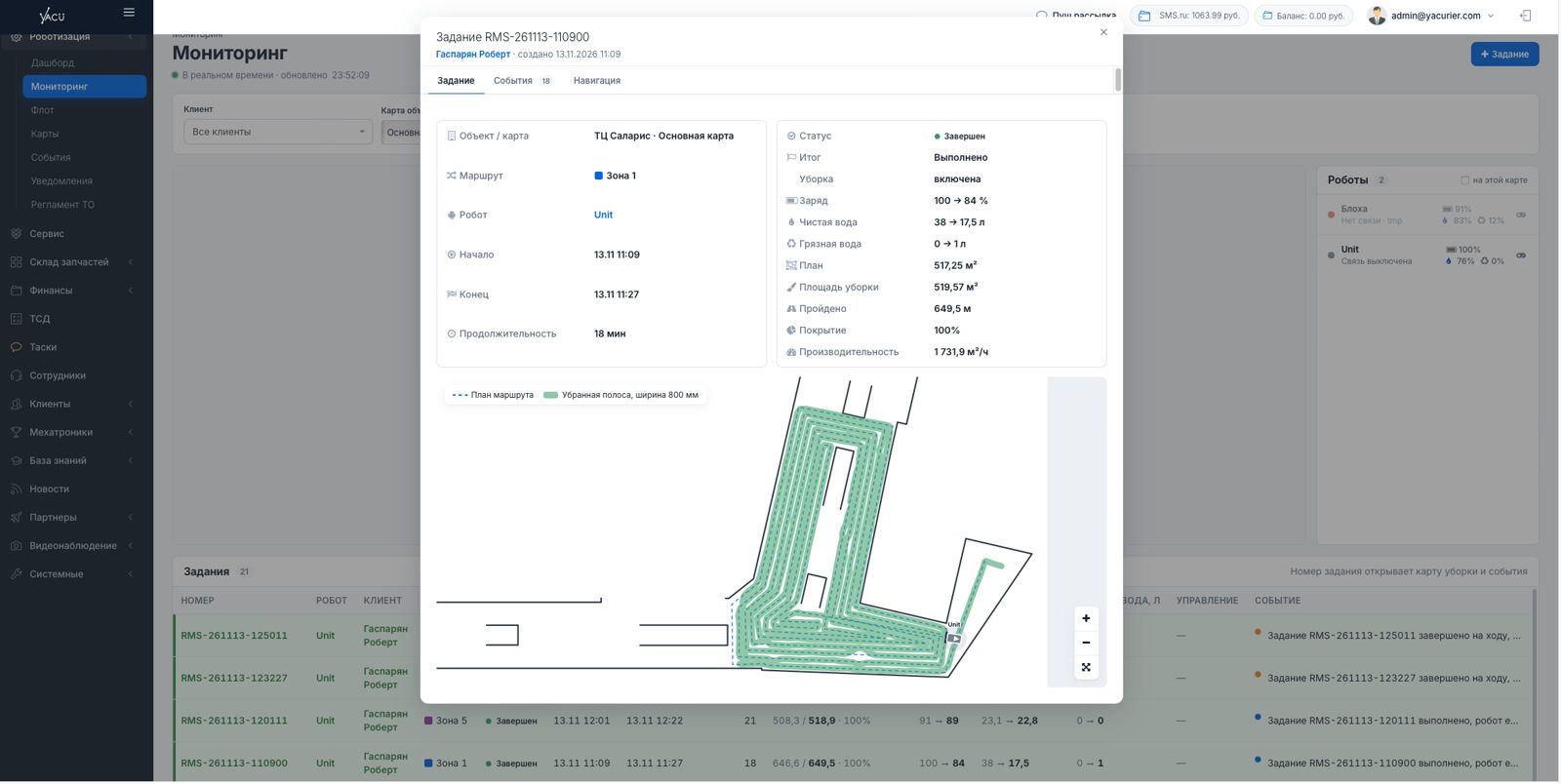
Route progress, battery, clean and dirty water in litres and route events — in one window.
Fleet dashboard
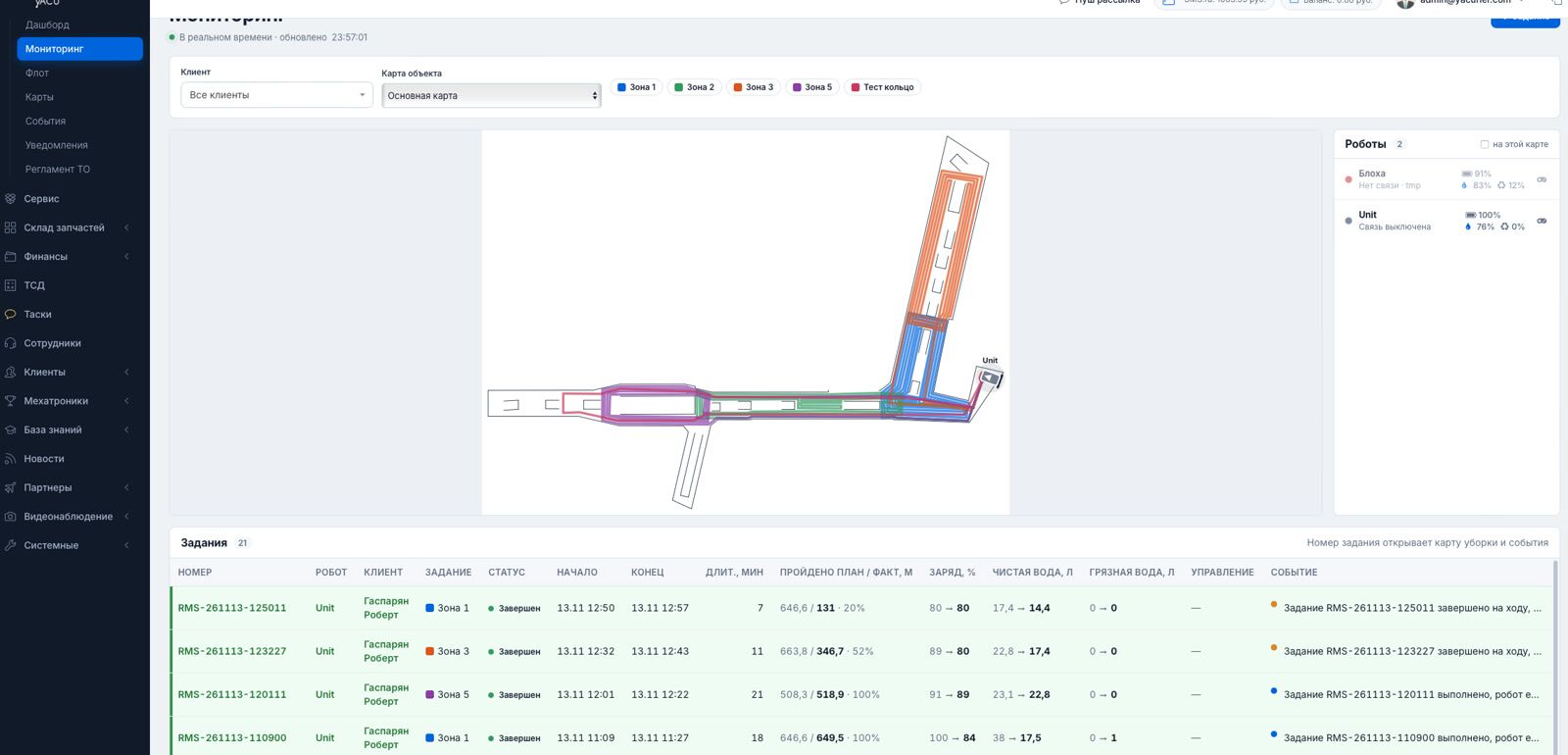
Who is online, who is on a route, who needs attention. Area, time, m²/h, water use and incidents compared across periods.
Alerts and auto-requests
A check every 30 seconds, severity levels H0–H7. Alerts from H5 create a service request automatically.
Telegram and PDF reports
A report with the path map after every cleaning. A monthly PDF with coverage heat maps and payback.
Routes as lines
An engineering editor: coverage check, snapping, parallel passes, “spiral” and “zigzag” templates.
Scheduling
Any number of “time + route” pairs per day. A task does not start if the battery is below 20% or water below 10%.
Maintenance by engine hours
Counters of engine hours, kilometres and cleaned area. Schedule, overdue work, warranty and work history in the robot card.
Service engineers
Service on a ride-hailing model: an engineer takes the job, travels to the site and leaves a report with photos.
Spare parts and billing
A catalogue with real stock levels, shipments, customer balance, invoices and a service library inside the system.
How RMS works
Robot monitoring: a single operator window
Robots work among people, carts and sudden obstacles. The faster the operator sees an event, the cheaper the consequences, so instead of a list of robots there is a live window where everything is visible at once.
- a site map with cleaning zones and robot positions;
- battery, clean and dirty water levels in litres;
- a joystick on the phone if a robot gets stuck in an awkward spot;
- a Start / Stop / Home remote: on “Home” the robot drives to the station and docks by the marker.
Dashboard and customer reports
Fleet status right now and totals for the period: cleaned area, cleaning time, completed tasks, productivity in m²/h, water consumption and incidents. Every metric is compared with the previous period.
- a Telegram report after every route — the customer's staff subscribe themselves;
- a monthly PDF: schedule compliance, area by day, incidents, service and coverage heat maps;
- payback calculation: the robot compared with cleaning by people on a ride-on scrubber.
Routes as lines, not zones
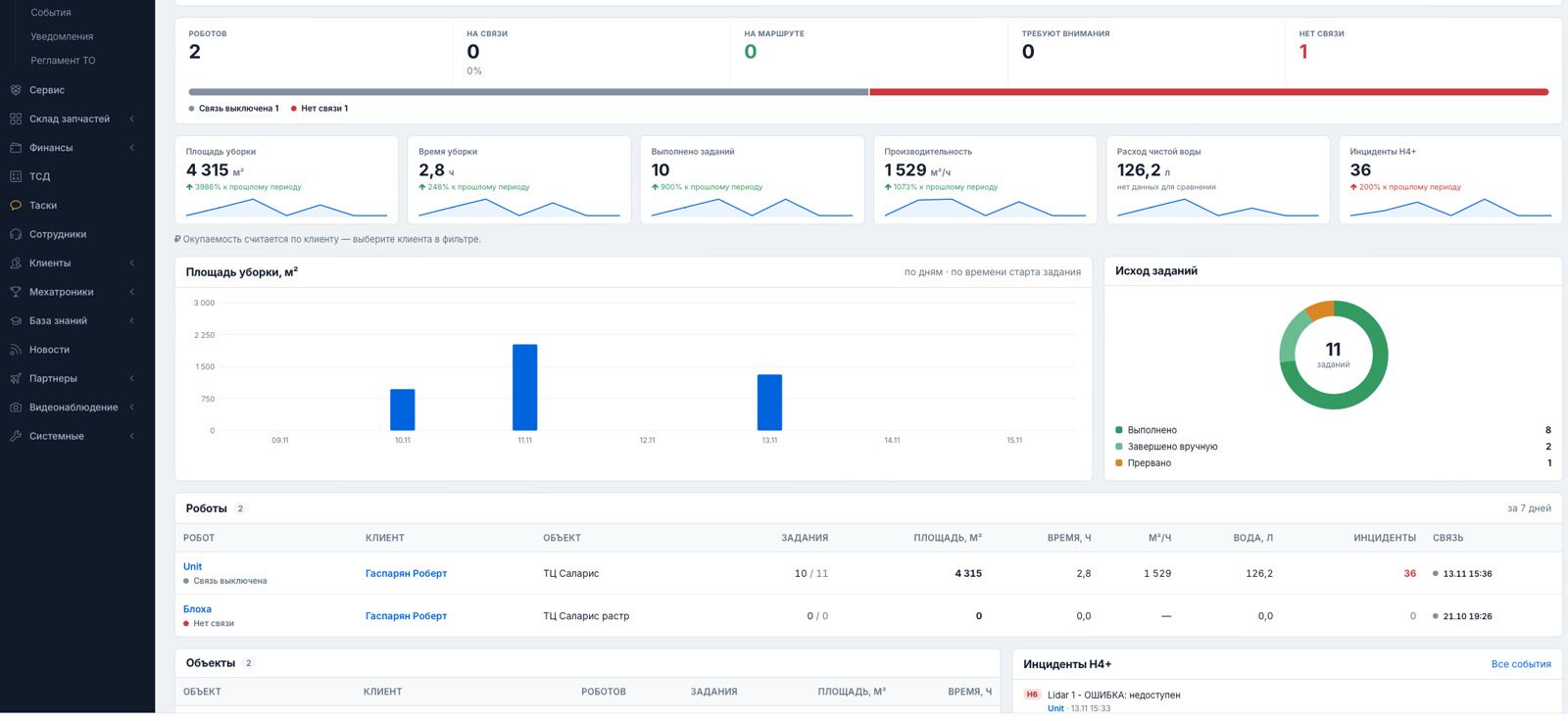
Usually a robot is given a zone and builds its own path. In a flow of people the global route has to be rebuilt constantly. Our routes are pre-set: the robot drives around an obstacle and returns to the same route.
- a line as wide as the cleaning strip, with corners smoothed to the robot's real turning;
- coverage check: single pass, repeated pass, gap;
- snapping, 45° angles, parallel passes and wall offset;
- auto-fill with “spiral” and “zigzag” templates and an eraser for lidar artefacts.

Robot card and maintenance by engine hours
The robot card is the single source of truth: tasks with map and water use, the event log, the schedule, comments for us and the customer and a large maintenance section.
- maintenance by usage, not the calendar: engine hours, kilometres and cleaned area;
- daily work, a post-running-in check, periodic maintenance — whichever comes first triggers;
- you can see when each consumable was replaced and how much warranty is left;
- equally convenient for purchased robots and rented robots.

Service, engineers and spare parts
Robots are spread across the city, so service works on a ride-hailing model: staff and freelance engineers see the job, and the one who is closest or on the way is assigned.
- a service report: defect, work done, parts, conclusion and a photo as proof for the customer;
- a spare parts catalogue with real stock and shipments linked to the robot and the engineer;
- bin-location storage in our warehouse: handheld terminal tasks, picking, packing, write-off;
- customer balance: invoice, payment and charges for parts, rental, service and visits.

A typical RMS vs. YaCu Robotics RMS
| Typical RMS | YaCu Robotics RMS | |
|---|---|---|
| Monitoring | Tasks, map, schedule | The same plus battery, water in litres, route events and a phone remote |
| Routes | Zone selection; the robot builds its own path and rebuilds it in a flow of people | Pre-set lines: the robot drives around an obstacle and returns to the route |
| Problems | Visible while someone is watching the monitoring window | A check every 30 seconds, H0–H7 alerts, automatic service requests |
| Customer reports | Manual export | Telegram after every cleaning, a monthly PDF with payback |
| Maintenance | Separate spreadsheets and messengers | Maintenance by engine hours in the robot card, service engineers, photo reports |
| Parts and money | An email chain: “send an invoice — we will pay — send the certificate” | A catalogue with stock, customer balance, invoices and services inside the system |
| Robot types | Robots from one manufacturer | The core is not tied to a robot: Unit today, architecture ready for other manufacturers and VDA 5050 |
Who RMS is for
Owners of cleaning robots
- predictable routes and consistent cleaning quality;
- a report after every cleaning and a monthly PDF;
- alerts without constant watching;
- transparent maintenance with photo proof.
Warehouses and manufacturing
- tasks from an external system or our WMS;
- allocation among logistics robots based on weight, load type and charge;
- roads between points for CarGo and stackers.
Service companies and dealers
- a single window across all customers and robots;
- automatic requests from alerts and maintenance by engine hours;
- service engineers on a ride-hailing model;
- finance, spare parts and warehouse in one system.
Autopilot for warehouse robots
The free robot is not always the best choice: one that is finishing a job nearby may be better. So instead of a task queue there is an autopilot. It filters out unsuitable robots, calculates the cost of every “robot — task” pair, assigns the best one and explains its choice.
At the start the autopilot works in suggestion mode: the system proposes and a person confirms.
What comes next
A screen on the robot
A tablet with the RMS screen: start, pause, home, route selection, joystick, water levels and a service call button.
Autopilot for logistics
Picking stations with a queue, aisle reservation and a double cycle for stackers.
Robots from other manufacturers
Connection through adapters: a new robot type is a new adapter, not a new system.
Robot management system FAQ
What is an RMS?
An RMS (Robot Management System) is fleet management software for robots. Usually it is a monitoring window with tasks, a map and a schedule. In our RMS that is the base, and around it are service, spare parts, billing, customer reports and the work of service engineers.
Which robots can be connected to RMS?
Today — Unit cleaning robots over our own protocol. The system core is not tied to a specific robot: each robot type connects through an adapter. The architecture is ready for robots from other manufacturers and for open standards such as VDA 5050.
Do I need to install any software?
No. RMS is a web system with two portals: an admin panel for us or a service company, and a customer account. You can drive a robot with the joystick and the Start / Stop / Home remote right from a phone.
How does the customer learn about the robots' work?
After every route a report arrives in Telegram: a map with the path driven, the area, the time and the result. Once a month a PDF report is generated with a comparison to the previous month, coverage heat maps and a payback calculation.
What happens if a robot stops at night?
Every 30 seconds RMS checks the fleet. If a cleaning did not start on schedule, a robot went silent, a task is taking too long or the water ran out, the system raises an alert. Alerts of level H5 and above create a service request automatically.
Is RMS suitable for rented robots?
Yes. Maintenance is built into every robot card: maintenance by engine hours, daily end-of-shift work and a work history with the engineer's photo report. For rental this is a critical part of the product.
Request an RMS demo
We will show the system on your tasks: cleaning robots, a warehouse or a service company. We will get back to you shortly.