


 Telegram
How we built RMS: a robot management system that manages everything around robots
On the market, an RMS is usually a monitoring window. You can view robot tasks, edit the map and set a schedule. That is the baseline, and we have it. But a working robot is more than a dot on a map. It is also service, spare parts, money, reports for the customer and the people who maintain it. Usually all of that lives in five different systems, messengers and spreadsheets.
We have been building WMS software for 8 years, so we took a different route: we combined robot management and the management of everything around robots in one system. In essence it is software for managing cleaning robots and warehouse robots, with service, a spare parts warehouse and customer billing built in. It works with different robot types: cleaning robots and logistics robots in the warehouse. Below I explain how it works and why we made these decisions. A short overview of the features is on the RMS robot management system page.
Architecture: one system, two portals
RMS is built as two portals on one data model: an admin panel and customer accounts. Each customer has their own sites, robots, maps and tasks. In the admin panel all of this is combined into shared lists across all customers: robots, tasks, events, requests and invoices.
We did not duplicate the backend. The admin panel and the customer account differ only in roles and permissions. That means every new feature appears on both sides at once, and the data never diverges.
Why: the customer sees only their own robots and does not drown in other people's data. We see the whole picture: where each robot is, what it is doing and what is happening to it. For a service company this is essential; otherwise incident response turns into a game of broken telephone.
One more important decision: the RMS core is not tied to a specific robot. Each robot type connects through its own adapter. Today these are our Unit robots over our own protocol. The architecture is ready for robots from other manufacturers and for open standards such as VDA 5050. A new robot type means a new adapter, not a new system.
Dashboard and robot monitoring: a single operator window
After login you land in monitoring, a single window that collects data from all robots and sites. In real time we see movement along routes, battery charge, clean and dirty water levels in litres and the events happening on the routes.
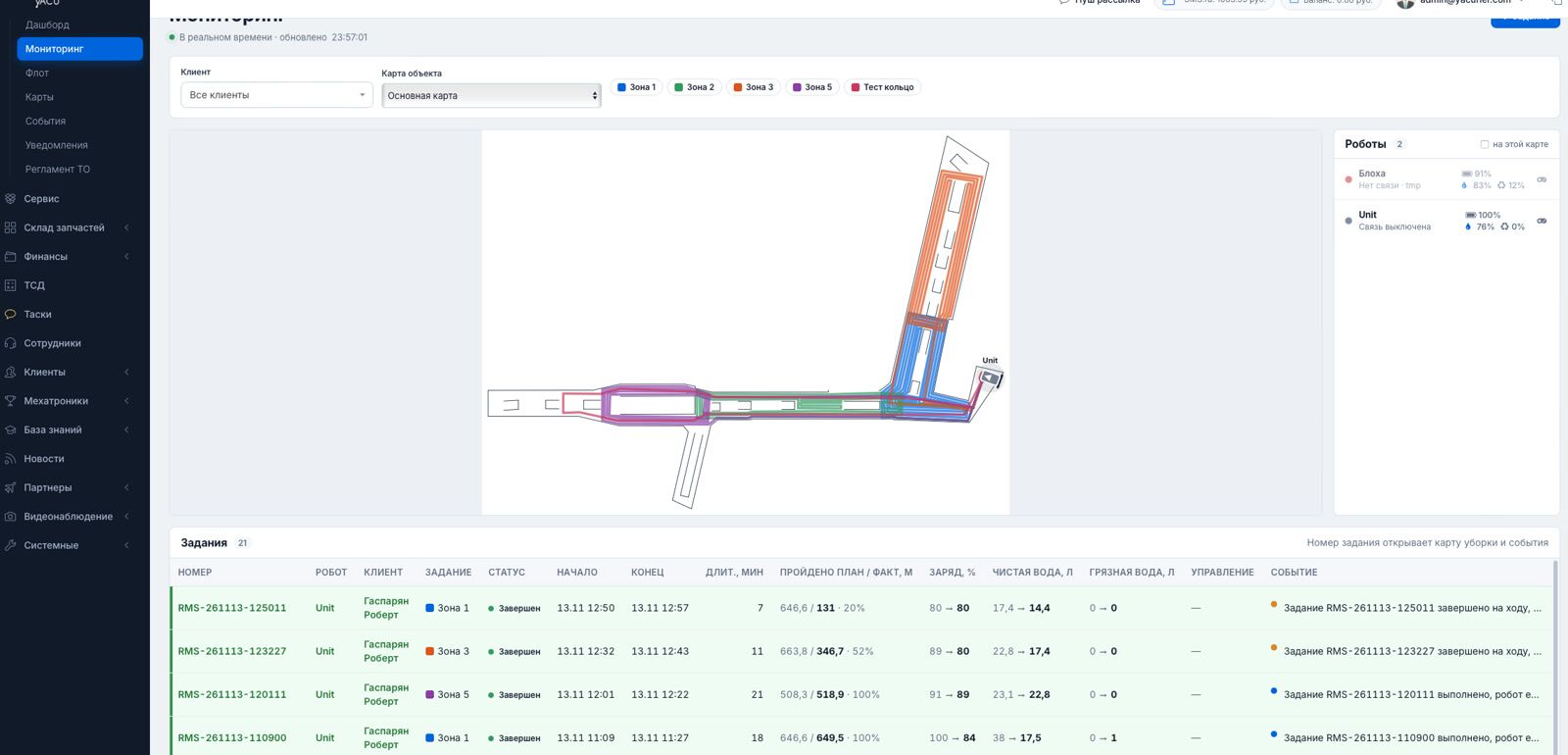
The reason is simple. Robots work in a dynamic environment: people, carts, sudden obstacles. The faster the operator sees an event, the cheaper the consequences. So instead of a list of robots we built a live window where everything is visible at once.
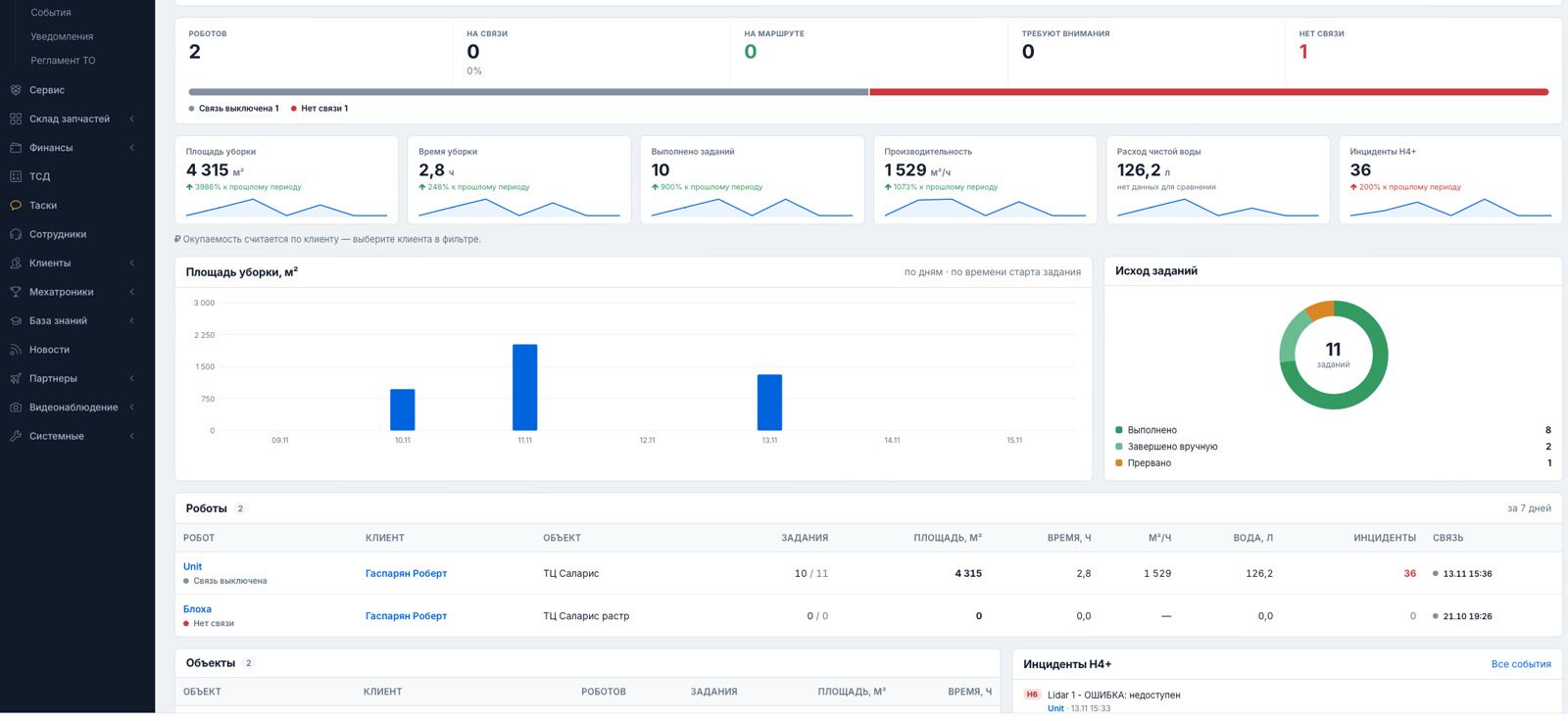
Next to monitoring is the dashboard. It shows the fleet status right now: how many robots are online, how many are on a route and which ones need attention. Below are the totals for the period: cleaned area, cleaning time, completed tasks, productivity in m²/h, water consumption and incidents. Every metric is compared with the same previous period.
We even added a joystick: right from a phone you can move a bubble and drive the robot like in a mobile racing game. It is not a toy. When a robot gets stuck in an awkward spot, an operator will get it out faster than an engineer who still has to travel to the site. Next to the joystick is a three-button remote: Start, Stop, Home. Home is a full scenario: the robot drives to the station, finds the marker with its camera and docks. Every stage is visible in the status.
Alerts: the system notices problems by itself
Monitoring is useful while someone is watching it. At night or on weekends nobody is, so we taught the system to watch by itself.
Every event has a severity level from H0 to H7. Every 30 seconds RMS checks the fleet and raises an alert if:
- a scheduled cleaning has not started 15 minutes after the planned time;
- an online robot has been silent for 10 minutes (after an hour the alert level goes up);
- a task is taking three times longer than usual for this route;
- by the evening it turns out the day passed without cleaning although it was scheduled;
- the clean water has run out or the dirty water tank is full.
Alerts of level H5 and above create a service request automatically. Nobody has to notice the problem and call: the request already exists and the mechatronics engineer sees it.
Reports: the customer learns about the work without logging in
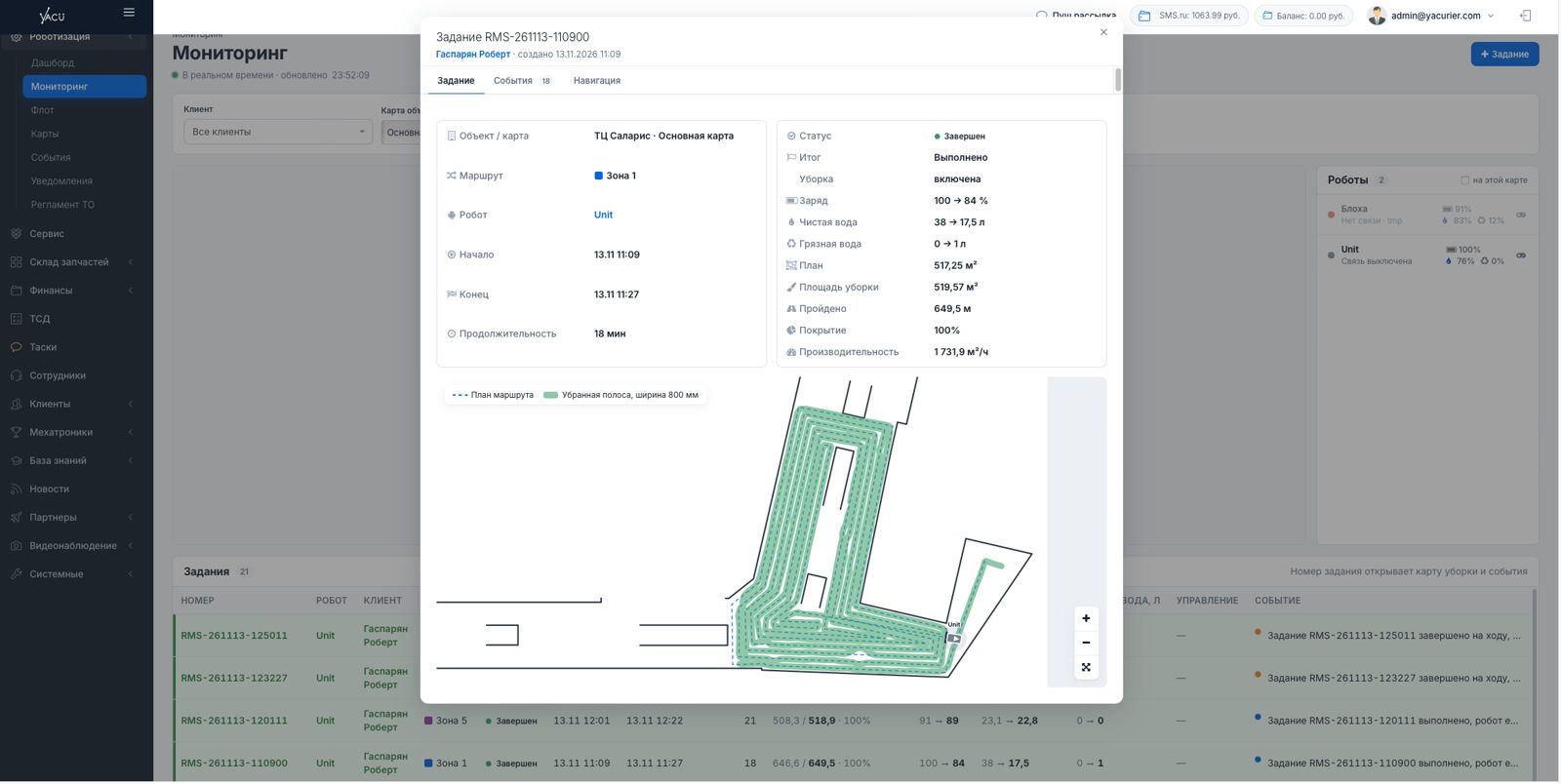
After every route the customer receives a report in Telegram: a map image with the path driven, the area, the time and the result. The customer's staff subscribe themselves using a link from their account. Alerts for their robots arrive there too.
Once a month a PDF report is generated. It contains the totals compared with the previous month, schedule compliance, area by day, incidents, service and coverage heat maps for each site map. It is a document the customer can put on management's desk.
A payback calculation can be switched on here as well. The system compares the robot with cleaning by people on a ride-on scrubber: how many staff and machines the same area would need and what that would cost per month.
Payback stops being a sales manager's promise in a presentation and becomes a number in a report.
Maps: why we draw routes as lines, not zones
A map can be created in the system or exported from the robot. We align it with the floor plan using reference points, add virtual walls and build routes.
The key difference is that our routes are pre-set. Others usually let you pick a zone and a fill pattern, and then the robot decides how to execute it. In a flow of people that becomes the stumbling block: the global route has to be rebuilt on the fly, which is a complex operation. People are everywhere, so it has to be rebuilt constantly. Our robot drives around an obstacle and returns to the same route.

We are used to drawing the path as lines, repeating what a person does. So our editor is almost an engineering tool:
- a line as wide as the cleaning strip, with corner smoothing that reflects how the robot really turns;
- a “how the robot will drive” preview showing the same arcs that will be sent to the robot;
- coverage check: green for one pass, orange for a repeated pass, red for a gap;
- snapping, 45° angles, length input from the keyboard, parallel passes and wall offset;
- auto-fill of an area with “spiral” and “zigzag” patterns. You can draw a zone, but the robot still receives a route you can see and adjust;
- an eraser for cleaning lidar artefacts from the robot's map.
This approach is not only for cleaning robots. For CarGo and stackers we also draw roads between points, and the robot then finds its way along them.
What it gives the customer: predictability. A cleaning robot in a shopping mall drives exactly where it was drawn, not where it “decided” to go at that moment. That means consistent cleaning quality and no surprises in busy areas.
Schedule and tasks: nothing gets lost
The schedule is set for each day of the week: any number of “time + route” pairs. There is a safeguard: if the battery is below 20% or clean water is below 10% of the tank, a scheduled task does not start. It waits, and a warning is written to the log.
Something we are proud of: RMS records even what was not launched from it. If a route was started directly on the robot, the system creates a task, calculates the area and includes it in the reports. Statistics are not lost even if someone on site did things their own way.
Fleet: the robot card as the single source of truth
This is where we add robots and set their characteristics and connection parameters. You can jump into a robot card from any part of the system, and it has many tabs:
- Tasks — everything the robot has done, with the map, path, water consumption and charge at start and finish;
- Log — all events and logs with severity levels;
- Schedule — which routes the robot must run and when;
- Comments — a shared feed for us and the customer;
- Maintenance — a separate large section.

Why maintenance is built into every robot card: the system has to be equally convenient for those who bought robots and those who rent them. For rental, maintenance is a critical part of the product, not an add-on.
Maintenance is based on usage, not the calendar. The system tracks engine hours, kilometres and cleaned area and compares them with the schedule: daily work, a check after running-in and periodic maintenance. Whatever comes first triggers. You can see when each consumable was replaced, what is overdue and how many engine hours remain on the warranty. The history records which work was done and by whom.
Mechatronics engineers: service on a ride-hailing model
We have a separate “Mechatronics” section: staff and, let us say, freelance service engineers. They work in our app, see a customer's job, can take it and complete it.
Why a ride-hailing model: robots are spread across the whole city, and we do not want to inflate headcount. Instead we can aggregate jobs for different specialists and assign the one who is closest or on the way.
It is not only about repairs. Rental robots need daily maintenance at the end of a shift: clean the suction bar and squeegee blades, rinse the tanks, clean the filters.
Every visit leaves a service report: the defect, the work done, the parts used and a conclusion. The engineer attaches a photo, which is stored in the job and serves as proof for the customer. The customer sees that the work was actually done, not just ticked off.
Finance: customer balance and payment inside the system
Each customer has a balance. They issue themselves an invoice in the system, pay it, and the money goes to the balance. Spare parts, rental, service and engineer visits are charged to the balance, and part of it goes to the engineer's balance, visible in their app.
Services come from a single library: visit, diagnostics, maintenance of different levels, component repair and commissioning. Each has a recommended price, and individual rates can be set for a customer.
Why it matters: so that service does not turn into an email chain of “send an invoice — we will pay — send the certificate”. Everything is inside one system with a transparent history.
Spare parts: a catalogue with real stock levels
Each customer, or we on their behalf, can order a part from the catalogue right in the system. Everyone sees the catalogue with real stock levels and, after a phone consultation, can create a shipment.
We assign the right engineer, and the customer sees their movement on the map and the result in the maintenance history.

What it gives: a part is not “ordered somewhere” but visible in the system and linked to a specific robot and engineer. For a fleet that works every day, downtime because of a missing consumable is direct money lost.
Here our WMS background works at full strength. On our side there is full bin-location storage: staff receive a task on a handheld terminal, pick the items, and the packing zone packs and writes them off. Everything is accounted for.
Knowledge base and live video of the assembly
Customers can leave requests in the system and our specialists handle them.
The customer has a knowledge base on almost every topic: commissioning, component layout diagrams, maintenance rules, videos on installing spare parts, working in the system and much more.
We even set up a live video stream of a robot being assembled for a specific customer. They receive an SMS with a link and watch their own robot being built in real time.
Why it matters: the less a customer depends on calling support, the faster they solve their task. The knowledge base and the assembly stream give them control instead of keeping them in the role of a petitioner.
Task allocation: why warehouse robots are harder
Cleaning robots live by a schedule. Warehouse robots receive tasks from an external system or from our WMS, and these have to be distributed among all active robots. The free robot is not always the best choice: one that is finishing a job nearby may be better even if it frees up a little later. Tasks also have to be split by weight, load type and battery charge.
A logistics robot is not just about movement. It is an intersection of constraints: payload, load type, remaining charge, aisle geometry and occupancy of narrow passages. A mistake in allocation means downtime, a dead battery in the middle of a shift or a missed shipment.
That is why we are building an autopilot rather than a task queue. The system filters out unsuitable robots and calculates the cost of every “robot — task” pair, taking into account the approach, the remainder of the current job, priority, deadline and charge. Then it assigns the best robot and explains why it chose it.
At the start it works in suggestion mode: the autopilot proposes and a person confirms. Next come picking stations with a queue, aisle reservation and a double cycle for stackers.
What comes next
The bottom line
I believe we have built a strong and well-thought-out product. It did not appear from scratch: it grew out of 8 years of our WMS work, with robotics woven in.
Most likely we will not keep it to ourselves and will bring it to market for companies that sell and service robots. Today they have two options: assemble monitoring, service, warehouse and billing from different systems themselves, or work in one.
In short, what RMS gives:
- Owners of cleaning robot fleets: predictable routes, a report after every cleaning, alerts without constant watching and transparent maintenance with photo proof.
- Warehouse sites: task allocation among logistics robots based on weight, load type and charge.
- Service companies: a single window, automatic requests from alerts, maintenance by engine hours, mechatronics engineers on a ride-hailing model, finance and spare parts in one system.
- Customers: a knowledge base, a live assembly stream, a monthly report with payback and a clear history for every robot.